
Testing CloudProxy Before Changing the DNS
If you would like to test every functionality of your site before changing the DNS records, you can do so by configuring your local DNS to use the CloudProxy IP address of your site, instead of the hosting IP address at Webhosting.net.
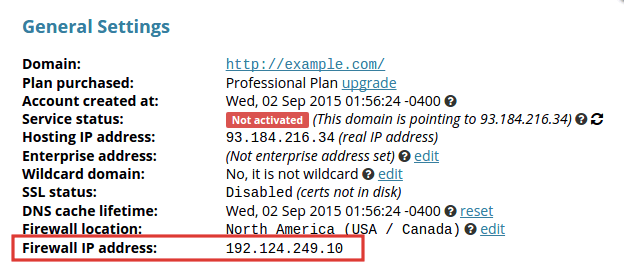
Finding your CloudProxy IP
Go to your CloudProxy Dashboard page, click on Settings and there you will see some info regarding your site, including the Firewall IP Address.
Manual Editing Hosts File
You can modify your /etc/hosts on Unix like systems or%SystemRoot%\system32\drivers\etc\hosts on Windows to bypass the DNS for your site. You will need to add a DNS modification at the top of that file telling your personal computer to go to the firewall IP address.
# /etc/hosts
127.0.0.1     localhost
::1           localhost  ip6-localhost  ip6-loopback

<cloudproxy-ip>  www.yourdomain.com  yourdomain.com
Where is the Firewall IP address and your-domain.com is the domain of your web site.
0
0